AI-Powered Tool for Pediatric Cardiology Education

Pediatric cardiac nurses struggle to illustrate complex heart conditions - most can't draw well enough, and patients often have multiple defects that create unique combinations impossible to find in textbooks. I designed an AI-powered tool that generates accurate, patient-specific diagrams and provides flexible presentation modes for consultations and family education.

Platform

Responsive web platform

Duration

2 month

My Role

Product Designer

Team

ML engineer, Backend engineers, Product manager

key outcome

Made cardiac illustration accessible to all nurses, not just those who can draw.

key outcome

Made cardiac illustration accessible to all nurses, not just those who can draw.

key outcome

Worked with ML engineers to adapt Google’s AI model for medical illustration.

key outcome

Worked with ML engineers to adapt Google’s AI model for medical illustration.

key outcome

Leveraged shadcn/ui component library to speed development.

key outcome

Leveraged shadcn/ui component library to speed development.

about

A pediatric cardiac nurse had created over 100 hand-drawn heart diagrams to explain surgeries to families. She wanted to automate this process and make accurate, high-quality diagrams accessible to other nurses and doctors.

In practice, each patient has a unique combination of cardiac defects, while textbooks usually show only single conditions. Clinicians need custom illustrations to explain the full surgical journey—how the heart looks now, what will happen during surgery, how it will look afterward, and how it differs from a normal heart. Without tools to create and compare these diagrams effectively, patient education becomes inconsistent and difficult.

01
Most nurses lack drawing skills for anatomically accurate diagrams

AI generates professional-quality diagrams in 2-5 minutes. No drawing skills required - nurses input medical terminology, system creates accurate illustrations.

02
Existing libraries only show single defects; real patients have unique combinations

AI creates any defect combination on demand. System handles VSD + coarctation + valve abnormality or any unique patient-specific combination.

03
Each case needs 2-4 related diagrams (before → during → after surgery)

Folder system organizes case progressions in one place. "Present all" launches sequential mode with timeline navigation through complete surgical story.

04
Comparison with normal heart is essential

Compare Set with built-in normal heart library. Side-by-side viewing with flexible pairing: patient vs. normal, pre-op vs. post-op, any combination.

05
Must work across contexts: screen presentation, tablet, printed handouts

Single tool serves all formats. Present Mode works on desktop and tablet, export creates PDF handouts - same diagram across all contexts.

06
Need ability to annotate while explaining

Live annotation tools available throughout Present Mode. Draw arrows, add text, highlight areas in real-time during consultation on any device.

From Clinical Input to Family-Facing Explanation

To support effective clinical communication, diagram creation must extend beyond a single generation step. This workflow was designed as a sequence of connected flows—input, refinement, organization, and presentation—each reducing cognitive load and friction while preserving context.

Diagram Creation

Defining a heart diagram requires users to configure multiple cardiac anomalies using complex medical terminology. Without a focused setup step, translating clinical intent into an accurate visual representation is error-prone and cognitively demanding.

1
2
3
1
2
3
1.
Smart search with auto-complete for medical terms

Supports both full names and acronyms for flexible medical search.

2.
Visual summary of selections

Prevents mistakes by showing all selected defects before generation.

3.
Additional Details

Captures specific clinical context to ensure the generated diagram matches the exact case.

Refinement Loop

The first generated heart diagram is rarely perfect. Users need to iteratively refine specific anatomical details without losing prior work or restarting the setup process

1
2
5
4
6
7
3
1
2
5
4
6
7
3
1.
Auto-populated diagram name

Eliminates manual typing and ensures consistent naming convention

2.
Basic Annotation Tools

Enable quick visual explanations so clinicians can prepare clear diagrams before the appointment.

3.
Auto-populated annotations

Reduces manual work by generating initial annotations directly from the selected anatomy and defects.

4.
Save draft vs Save to library options

Draft system allows work-in-progress without cluttering library

5.
Present Mode

Provides one-click access to presentation view for smooth, uninterrupted explanations.

6.
Flexible Prompting

Allows updating the entire diagram or refining a selected area to reduce hallucinations and speed up generation.

7.
Version history

Preserves previous versions so user can revert if refinement goes wrong

Organizing Case Progressions

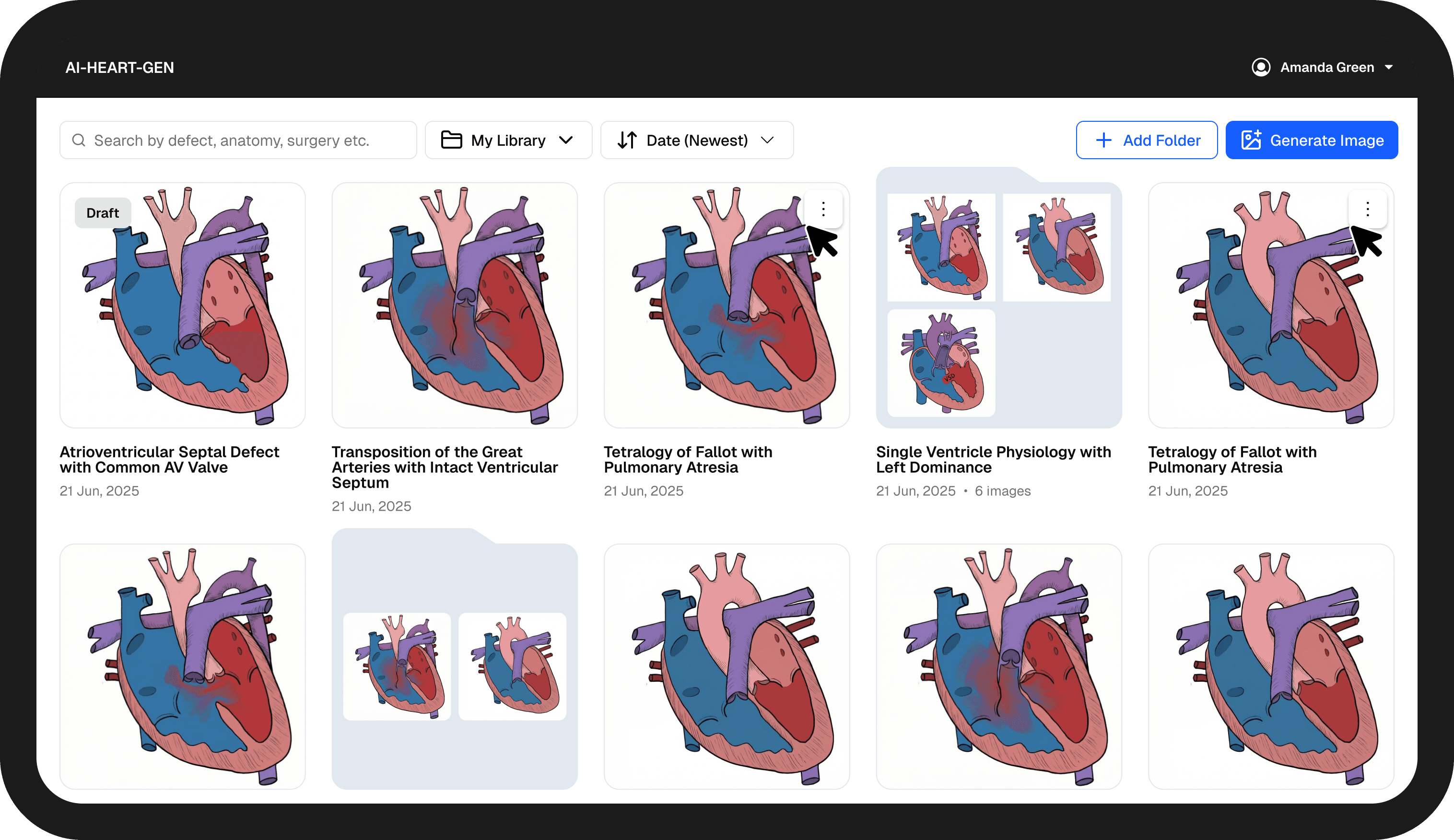
Each case needs 2-4 diagrams showing surgical progression. Without organization, these become scattered files that are hard to present as a cohesive story. Nurses need to show: "Here's the heart now → Here's what we'll do → Here's how it will look after."
4
3
2
1
4
3
2
1
1.
Search Across Cases

Keeps the ability to search by defect, anatomy, or surgery, whether diagrams are standalone or part of a case.

2.
Multiple Libraries

Keeps work clearly separated and easy to share across personal, team, and public contexts.

3.
Creating Folders

Ensures surgical steps are shown in the right sequence, not lost across separate images.

4.
Visual Folder Previews

Saves time and reduces mistakes by showing case progression at a glance before opening anything.

Present Mode

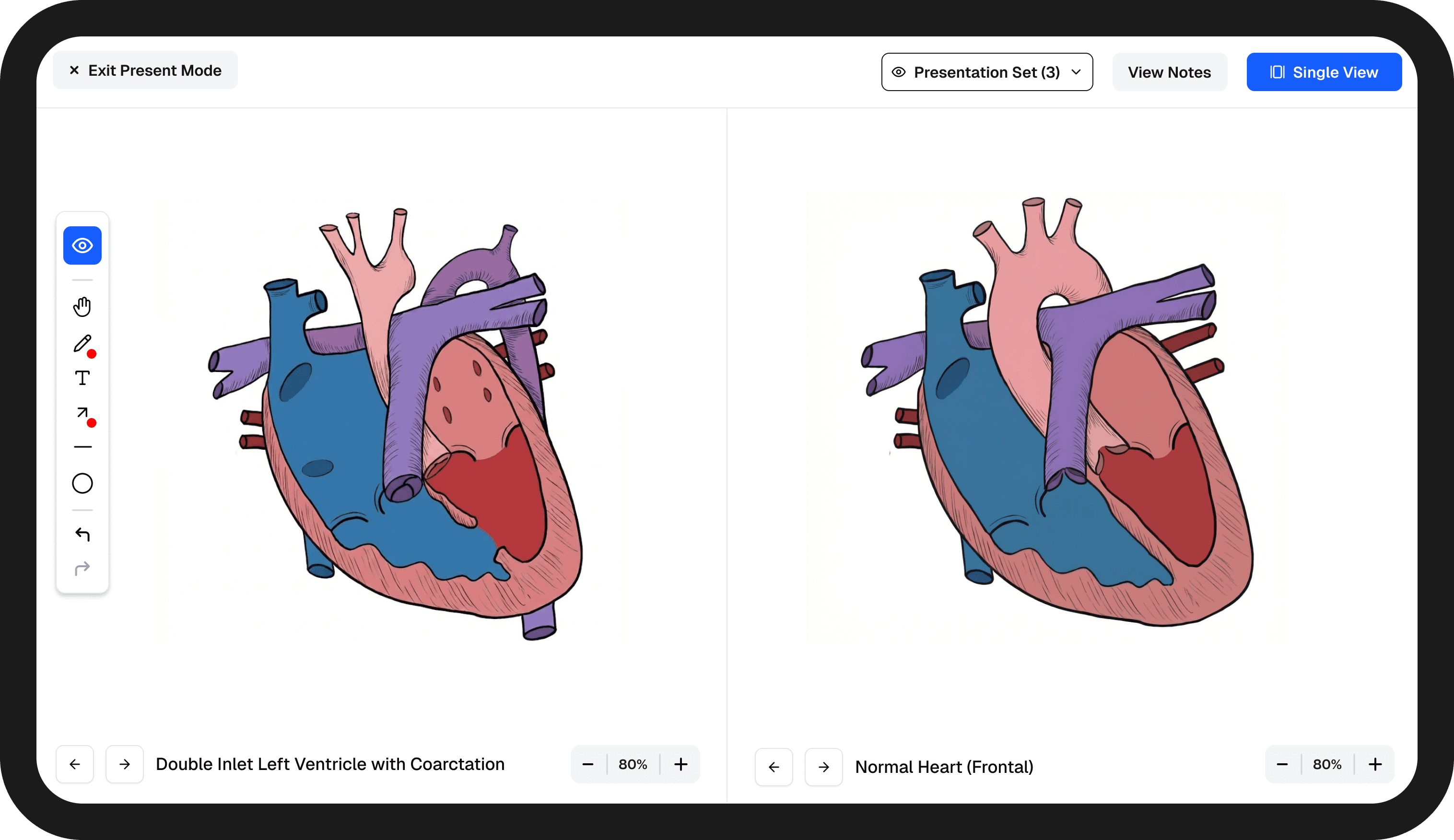
Explaining heart conditions requires two critical capabilities: comparing the patient’s heart to a normal heart, and showing surgical progression. Presenting these requires smooth navigation and flexible comparison without breaking the flow of explanation. Clicking back to library, finding the right diagram to compare, and re-entering present mode disrupts the consultation and loses families’ attention.

single view
1
3
4
2
1
3
4
2
side-by-side
5
6
5
6
5.
Independent Navigation

Saves time and reduces mistakes by showing case progression at a glance before opening anything.

6.
Return to Single View

Allows quick transition back to sequential storytelling once comparison is complete.

1.
Live Annotations

Preserves access to drawing and notes so doctors can explain findings directly during presentation.

2.
Presentation Set Navigation

Lets clinicians switch between selected images in the presentation set.

3.
Custom Presentation Set

Allows control over which case diagrams and normal hearts are included in the sequence.

4.
Compare Anytime

Lets clinicians switch to side-by-side comparison at any moment without interrupting the explanation.

Sum Up

Next Steps

Internal Validation & AI Model Refinement

Test AI generation accuracy across diverse defect combinations. Validate that complex multi-defect illustrations maintain anatomical accuracy and visual clarity. Iterate on model prompting strategies based on medical review to ensure generated diagrams meet clinical standards.

Internal Validation & AI Model Refinement

Test AI generation accuracy across diverse defect combinations. Validate that complex multi-defect illustrations maintain anatomical accuracy and visual clarity. Iterate on model prompting strategies based on medical review to ensure generated diagrams meet clinical standards.

Pilot Testing & Iterative Enhancement

Launch pilot program with cardiac nurses across 2 hospital locations. Observe real-world usage during patient consultations, gather feedback on workflow integration, and measure time savings and educational effectiveness. Iterate on product based on insights: expand educational features, refine Present Mode and export capabilities, address edge cases discovered in clinical use.

Pilot Testing & Iterative Enhancement

Launch pilot program with cardiac nurses across 2 hospital locations. Observe real-world usage during patient consultations, gather feedback on workflow integration, and measure time savings and educational effectiveness. Iterate on product based on insights: expand educational features, refine Present Mode and export capabilities, address edge cases discovered in clinical use.

Monetization & Scale

Introduce subscription model with two tiers: individual plans for private practice nurses and organizational plans for hospital-wide deployment. Enable organization-level libraries for shared educational resources. Expand to additional cardiac care centers and build sustainable business model.

Monetization & Scale

Introduce subscription model with two tiers: individual plans for private practice nurses and organizational plans for hospital-wide deployment. Enable organization-level libraries for shared educational resources. Expand to additional cardiac care centers and build sustainable business model.

Sum Up

Key Takeaways

Understanding Real Clinical Workflows Over Stated Requirements

The initial request was "help me create diagrams faster." Through research, I discovered the real problem was organizing multi-diagram progressions and presenting them effectively during time-limited consultations. This reframing shifted the solution from a simple generator to a complete creation-organization-presentation system.

Understanding Real Clinical Workflows Over Stated Requirements

The initial request was "help me create diagrams faster." Through research, I discovered the real problem was organizing multi-diagram progressions and presenting them effectively during time-limited consultations. This reframing shifted the solution from a simple generator to a complete creation-organization-presentation system.

Invisible Design: Automation with Control

The most impactful features are often the ones users don't notice. Auto-naming from defects, auto-generated annotations, and context-aware navigation eliminate repetitive work while maintaining full user control. Users don't think about these features - their workflow just feels effortless.

Invisible Design: Automation with Control

The most impactful features are often the ones users don't notice. Auto-naming from defects, auto-generated annotations, and context-aware navigation eliminate repetitive work while maintaining full user control. Users don't think about these features - their workflow just feels effortless.

AI Collaboration Requires Design-Engineering Partnership

Successful AI integration isn't just about prompts - it's understanding generation time constraints (15-30 seconds), designing for non-deterministic outputs (version history), and turning model capabilities into features (auto-annotations). Close collaboration with ML engineers shaped interaction patterns that work with AI behavior, not against it.

AI Collaboration Requires Design-Engineering Partnership

Successful AI integration isn't just about prompts - it's understanding generation time constraints (15-30 seconds), designing for non-deterministic outputs (version history), and turning model capabilities into features (auto-annotations). Close collaboration with ML engineers shaped interaction patterns that work with AI behavior, not against it.

Contact

Let’s work together

Tell me what you’re building and where you need help. I’ll review your product and get back to you with the best next step.

Fill the form or contact me at annvelcheva@gmail.com

|

© 2026 designed and implemented by Anna Velcheva

Contact

Let’s work together

Tell me what you’re building and where you need help. I’ll review your product and get back to you with the best next step.

Fill the form or contact me at annvelcheva@gmail.com

© 2026 designed and implemented by Anna Velcheva

View Resume